A DeepL-like translation experience running entirely on your infrastructure. Upload a PDF or paste text, select your languages, and get a translated document with the original layout preserved — side-by-side view, synchronized highlighting, and one-click PDF export included. Because the AI runs on-prem, no data leaves your environment — ideal for confidential documents, legal texts, and internal communications.
Business Impact
Challenge
Translating internal documents through cloud services like DeepL or Google Translate raises data privacy concerns — confidential content leaves the organization.
Solution
A self-hosted translation app powered by on-prem open source models provides the same user experience without any data leaving the infrastructure.
Outcome
Enterprise-grade translation with full data sovereignty — confidential documents stay on-prem while users get a familiar, polished translation interface.
What It Does
PDF Translation — Upload a PDF via drag-and-drop. The translated document appears side by side with the original, with synchronized highlighting so you can trace every sentence back to its source.
Plain Text Translation — Switch to text mode, paste content, and translate directly. Same language support, no document upload needed.
PDF Export — Export the translated content back as a PDF with the original layout preserved. Ready to share or archive.
Full Data Sovereignty — Runs on your own infrastructure with on-prem hosted models. No data leaves your environment — suitable for confidential, legal, and internal documents.
11+ Languages — Supports German, English, Spanish, French, Italian, Portuguese, Dutch, Polish, Russian, Japanese, Chinese, and more — with automatic source language detection.
How It Works
Snippet-Level Translation — The custom UI uses pdf.js to extract text snippets from the PDF with full positioning metadata. Snippets are grouped into sentences and translated individually via parallel requests to the Reaktor API. Low temperature (0.2) ensures consistent, literal translations.
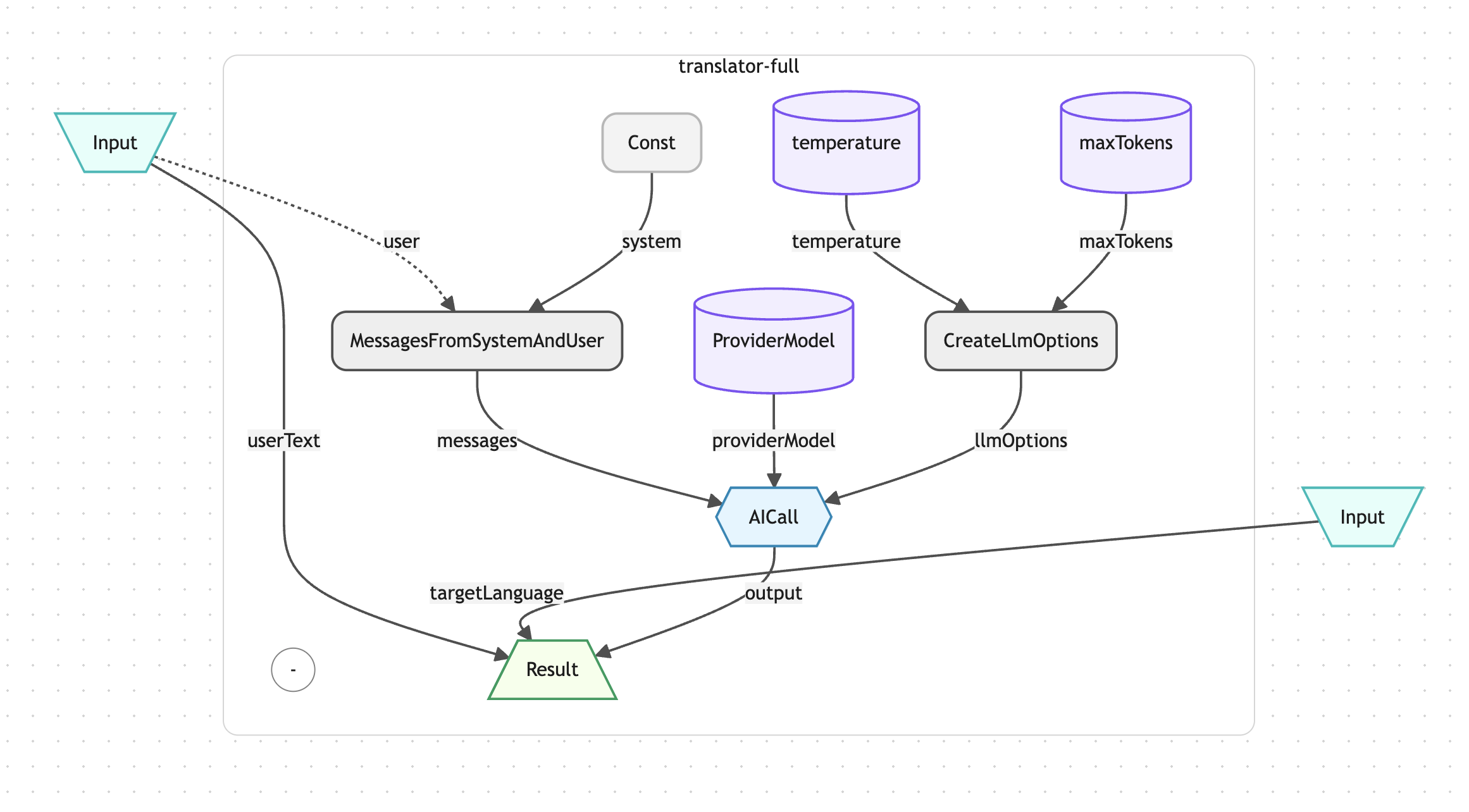
LLM-Based Translation Pipeline — Each translation request flows through aktorCreateSystemPrompt (language-specific rules), aktorMessagesFromSystemAndUser (prompt formatting), and aktorAICall (LLM invocation). The system prompt enforces strict rules: translate only, preserve formatting, keep numbers and symbols unchanged, return text without explanation.
Provider-Agnostic Architecture — aktorAISettingProviderModel abstracts the LLM provider. The same Reaktor works with on-prem open source models, Azure OpenAI, or any other provider configured in Operaide — no code changes needed, just a settings update.
Integrated Custom UI — The public/ directory ships a complete translation interface: drag-and-drop upload, language selectors, side-by-side preview with synchronized highlighting, settings modal, and PDF export. The UI calls the Reaktor's REST endpoint with Operaide authentication — no separate frontend infrastructure required.
PDF Reconstruction — pdf-lib handles the export phase: translated text is positioned according to the original layout metadata, fonts are embedded, and the result is downloadable as a new PDF with translations in place.
Reaktor Architecture
The Translator app registers two Reaktors with a shared custom UI. The piece translator Reaktor handles individual snippet translations: it receives source language, target language, and content, builds a strict system prompt via aktorCreateSystemPrompt, formats the messages with aktorMessagesFromSystemAndUser, sets LLM options (temperature 0.2, max tokens 1000) via aktorCreateLlmOptions, and calls aktorAICall with the configured provider model. The full text Reaktor follows the same pattern with slightly higher temperature (0.3) and token limit (2000) for full-document translations. The custom UI in public/ orchestrates the workflow: it parses PDFs with pdf.js, sends parallel translation requests to the piece translator, renders results as markdown with synchronized highlighting, and exports translated PDFs via pdf-lib.
Why Operaide
Ready to Ship AI
That Works?
See how Operaide helps teams ship reliable AI applications faster. From prototype to production—with complete control and European sovereignty.